Guide to Corporate Video Production: From Script to Screen
Corporate videos help businesses build trust, train employees, and support marketing goals. This guide breaks down the three phases of production, pre-production, filming, and editing, along with the mistakes to avoid so companies can plan a video that actually delivers results.
.jpg)
Corporate Video Production: A Complete Guide for Businesses
Corporate videos have become a major aspect of modern business communication. Companies use videos to introduce themselves, market their products and services, conduct training, share company news, and strengthen ties with customers. With an effectively created video, the information is presented clearly and professionally in an interesting manner.
- 91% of modern businesses use videos in their marketing campaigns.
- Streaming and downloading videos occupy 82% of all online traffic.
- If you embed a relevant video on your landing page, you will get an 86% conversion rate.
- 89% of customers believe that video quality affects their trust in a brand.
- 49% of professional marketers claim that short form videos give them the best return on investment according to the latest video marketing benchmarks.
Making an effective corporate video requires following certain processes. These include planning, writing, shooting, editing, and final delivery of the video. The budget for making a video depends on various factors, including the video idea, filming needs, equipment, personnel, etc. Companies that collaborate with skilled video production professionals can set their objectives, allocate resources effectively, and achieve their goals. The following post will help you break down the entire process of creating your corporate video into simple steps.
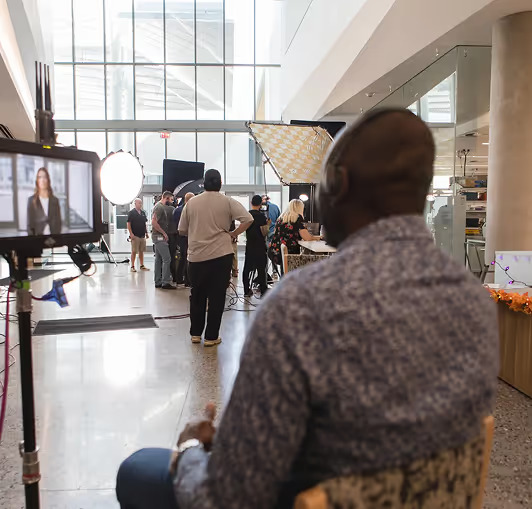
What Is Corporate Video Production?
Corporate video production is the creation of videos for business purposes. In contrast with videos made purely for entertainment, corporate videos are intended to facilitate the following activities.
Businesses use corporate videos to:
- Promote products and services
- Explain company values
- Train employees
- Share customer success stories
- Present company achievements
- Support sales and marketing campaigns
- Improve internal communication
These videos can be posted on web pages, social media pages, email campaigns, and company events.
Types of Corporate Videos
Companies can choose different video formats based on their objectives and intended viewership. This allows the company to convey its messages effectively to its target audience.
- Brand Videos: Top-level videos aimed at presenting a business’s vision, mission, and culture to potential customers and the general public.
- Product Demos: Step-by-step instructions on using a product or service and showcasing its benefits to solve particular customer issues.
- Testimonials: Interviews with satisfied customers that tell real success stories and create trust.
- Training & Onboarding: Internal videos used for training purposes, which can include educating employees about new skills or company policy.
- Company Updates: Informational messages from management that provide updates on quarterly performance, business achievements, or organizational events.
-

The Three Main Phases of Video Production
A typical video production will consist of three basic phases, namely, pre-production, production, and post-production. Failing to follow any stage may increase costs, waste time, and result in poor-quality work.
Phase 1: Pre-Production (The Planning Stage)
The pre-production stage is the most important one. Mistakes made during shooting can be avoided through proper planning. It includes setting goals, writing the script, and logistics planning.
1. Define the Goal and Audience
Before writing a script or picking up a camera, you must answer two simple questions.
- What is the objective behind creating this video? (e.g., advertising an item for sale, induction of new employees, or conveying important company information.)
- Who is the target audience? (e.g., potential customers, employees, or investors).
2. Write the Script
An effective business script must always use plain language to avoid technical jargon that may confuse viewers. It should have concise sentences.
In terms of formatting the business script, it is extremely useful to make use of a two-column format, where:
- Left Column (Images): The viewer sees.
- Right Column (Sound): Voice-overs and sound effects.
3. Create a Storyboard
A storyboard is a set of drawings or digital images used to create an overview of the story's scenes. The storyboard will show how the different scenes should appear to the viewer after the cameras are introduced.
4. Location Scouting and Logistics
You have to choose the shooting place. When shooting indoors in an office setting, watch for background noise and lighting issues. In this phase, permissions will be obtained, actors will be hired, and the shooting schedule will be set.
Phase 2: Production (The Filming Stage)
Recording takes place during the production process. The script and storyboard will be transformed into real recordings.
1. Setting Up the Camera and Lighting
For corporate videos, it is important to ensure stability and proper lighting for the shots taken.
- Camera: In order not to have unstable shots, use a tripod. The camera parameters (resolution and frame rate) must match those required for filming.
- Lighting: Good lighting ensures the professionalism of the shot taken. There is a standard arrangement called "three-point lighting," including the key light, the fill light, and the backlight.
2. Capturing High-Quality Audio
The audience can withstand poor-quality videos, but they will never watch if the audio quality is poor.
- Make use of a professional microphone (i.e., lavalier/microphone that you clip onto the speaker's shirt or a shotgun mic mounted on a boom).
- Never use the camera's built-in microphone, since it picks up too much ambient sound.
3. Filming A-Roll and B-Roll
To ensure that the video remains captivating, you should shoot the following two types of videos:
- "A-roll": This is the main content being captured. It is normally shot when the person being interviewed is speaking to the camera.
- "B-roll": These are additional clips that support and supplement the main footage captured. They include scenes that illustrate what the interviewer is talking about (for example, employees at work, product footage, and footage of the office building).
Phase 3: Post-Production (The Editing Stage)
After the shoot, the video enters post-production. It is during this stage that the pieces come together to form a cohesive story.
1. Logging and Organizing Footage
Before editing, make sure that all video/audio files are properly organized into labeled folders. Make backup copies of the files using several hard disks.
2. The Rough Cut
The editor then adds the finest A-roll shots to the timeline to create the foundation for the video. At this point, the only concerns will be pacing and message.
3. Adding B-Roll and Graphics
After the rough cut is approved, the video editor adds B-roll visuals with sound. Some other additions are made by the editor as well, for instance:
- Lower Thirds: Text graphics that show who the speaker is, along with their designation.
- Callouts: These indicate various features of a product by using text on the screen.
4. Audio Mixing and Color Correction
- Color Correction: The editor makes the shots appear realistic and identical by balancing the color correction and contrast.
- Audio Mix: The editor ensures balanced audio mixing. The speaker's voice should be clear, and the background music should not be loud enough to overshadow the spoken words.
Common Mistakes to Avoid in Corporate Video Production
These are some things that you need to avoid to save on both time and money:
- Making the video too long: Companies appreciate conciseness. In most social media or marketing videos, the perfect duration is 1 to 2 minutes. Longer training videos should have sections for easy navigation.
- Ignoring the background: A messy background can damage your business's image. It is necessary to film in an organized environment.
- Lack of a Call to Action (CTA): Each video needs a CTA at the end so viewers know what action to take. It may involve directing them to a website or a sales team.
Conclusion
Corporate video production is one of the most effective ways for businesses to communicate, whatever their size or industry. From employee training and recruitment to advertising and customer education, a well-planned video can achieve what text and static content simply can't. The process demands careful planning, quality production, and thoughtful editing, but the payoff is a piece of content that builds trust and drives action. Companies that partner with experienced professionals for their corporate video production can turn a clear strategy into a video asset that consistently supports their business goals.
Related Posts
%20(1).avif)
.avif)
.avif)
.png)
.png)